FOR REFERENCE ONLY · Always subordinate to your TMs, AMMs, Work Cards, and approved procedures.FOR REFERENCE ONLY — subordinate to your TMs & Work Cards.
iOS 17+App Store · Build 27$2.99 one-time

FRO doesn't replace your TMs or AMMs.
It remembers what they don't.

Which socket fit. What hazmat actually worked. The alternate you ended up using when the spec tool was missing. Who you borrowed it from. The stuff that lives in your notebook — except now you can search it, share it, and find it three years from now.

Download on the App Store $2.99 · No subscriptions, no ads, no accounts
Built for A&P students AMTs IAs Military maintainers Rotorcraft techs Part 145 / MRO Avionics techs QA inspectors DOMs GA & homebuilders

Built for Airframe & Powerplant Mechanics — the ones who'll see this job again in three months, a year, or three years.

§ 1

The logbook a mechanic never had

Personal logbook

Pilots have logbooks.
Aircraft have logbooks.
Now you have one too.

Treat it like a flight logbook. One entry per job. The first few months feel light — by year two, you've got a real reference. By year five, it's the most useful book in your toolbox, and the only one written entirely in your own voice.

  • Month 1the loop clicks
  • Year 2~50 jobs
  • Year 3~125 jobs
  • Year 5~250 jobs
§ 2

What it does, and what it doesn't

Scope

It does 07

  • Logs jobs after you finish them — aircraft, system, what you used, what you learned
  • Keeps your tool inventory: condition, location, calibration dates, who borrowed what
  • Searches every job and tool you've ever logged. Fuzzy matching, no typing perfect
  • Generates printable PDF reports for the binder or the toolbox
  • Exports single jobs or tool kits for AirDrop to a teammate
  • Tracks time on task with a punch clock — actual hours, not guessed hours
  • Runs fully offline. Hangars, flight lines, bays with no signal

It doesn't 06

  • Replace Technical Manuals, Work Cards, or approved procedures
  • Sign off on anything. There are no approvals, audit trails, or QA workflows
  • Sync to a cloud. Your data stays on your device
  • Need an account or login
  • Collect telemetry, analytics, or usage data of any kind
  • Charge a subscription. $2.99 once, that's the whole transaction
§ 3

Sticky notes, made searchable

Premise

Every TM had them. Yellow stickies, pencil margins, dog-eared pages with arrows. The real knowledge — the stuff that wasn't in the procedure but mattered every time you ran it.

Sticky · TM pg 4-12
“Don't use this socket — it rounds the head. Try the deep 12pt.”
Margin · TM pg 7-3
“Ground strap goes here, not where the diagram shows.”
Tab · TM pg 11-9
“Use the alternate hazmat. Spec one ate the seal twice.”
Pencil · TM pg 3-7
“Torque to 32 ft-lb here. Spec calls for 28 — strips threads on this airframe.”

Digital manuals don't have margins. PDFs don't take stickies. The shared knowledge that used to live in those notes is gone — or sitting in someone's locker, on the back of a work card, only useful to one person.

TM 1-1500-204 · PG 7-3FIG 7-2
Engine Cowling — Removal
7.3.2 · Procedure
01.Disconnect electrical bonding strap.
02.Apply torque to fastener per Fig 4-12 spec.use 12pt deep socket
03.Remove forward fairing screws (qty 6).
04.Lift cowl assembly clear of mounting brackets.
7.3.3 · Cautions
Ground strap routing per diagram 7-2.
Use approved hazmat per appendix B.
spec socket rounds the head every time— J. Reyes, 4/12
ground strap goes left of bracket, not right — fixed twicesee pg 11-9
Before — the TM in the binderKnowledge lives on stickies and pencil margins. Useful to whoever's holding the page.
FRO · JOB #0247LOGGED 04/12
Engine Cowling — Removal
AircraftUH-60M · 21-26789 SystemPowerplant · Cowling Time on task1 h 40 m ReferenceTM 1-1500-204 pg 7-3
Tools used
12pt deep socket ½"torque wrench cal 02/26cowling stand
Notes for next time
Spec socket from TM rounds the head — use the deep 12pt instead. Confirmed on two prior jobs.
Ground strap routes left of the bracket. The diagram on pg 7-2 shows it on the right; that's wrong on this airframe.
Search hits this entry on
cowlingsocket roundsground strapUH-60Mpg 7-3
After — the same notes, in FROSearchable, readable, shareable. The sticky finally has a home.

FRO is the format those notes deserved all along. Searchable — by aircraft, system, or the word you can almost remember. Readable — your voice, your structure, six months or six years later. Shareable — AirDrop a job to the new mechanic on the line, or trade the whole library with a teammate. The sticky note finally gets a system around it.

— same notes. Same voice. Just findable now.Author's note · Build 27
§ 4

Plates

Build 27 · iPhone 17 Pro Max
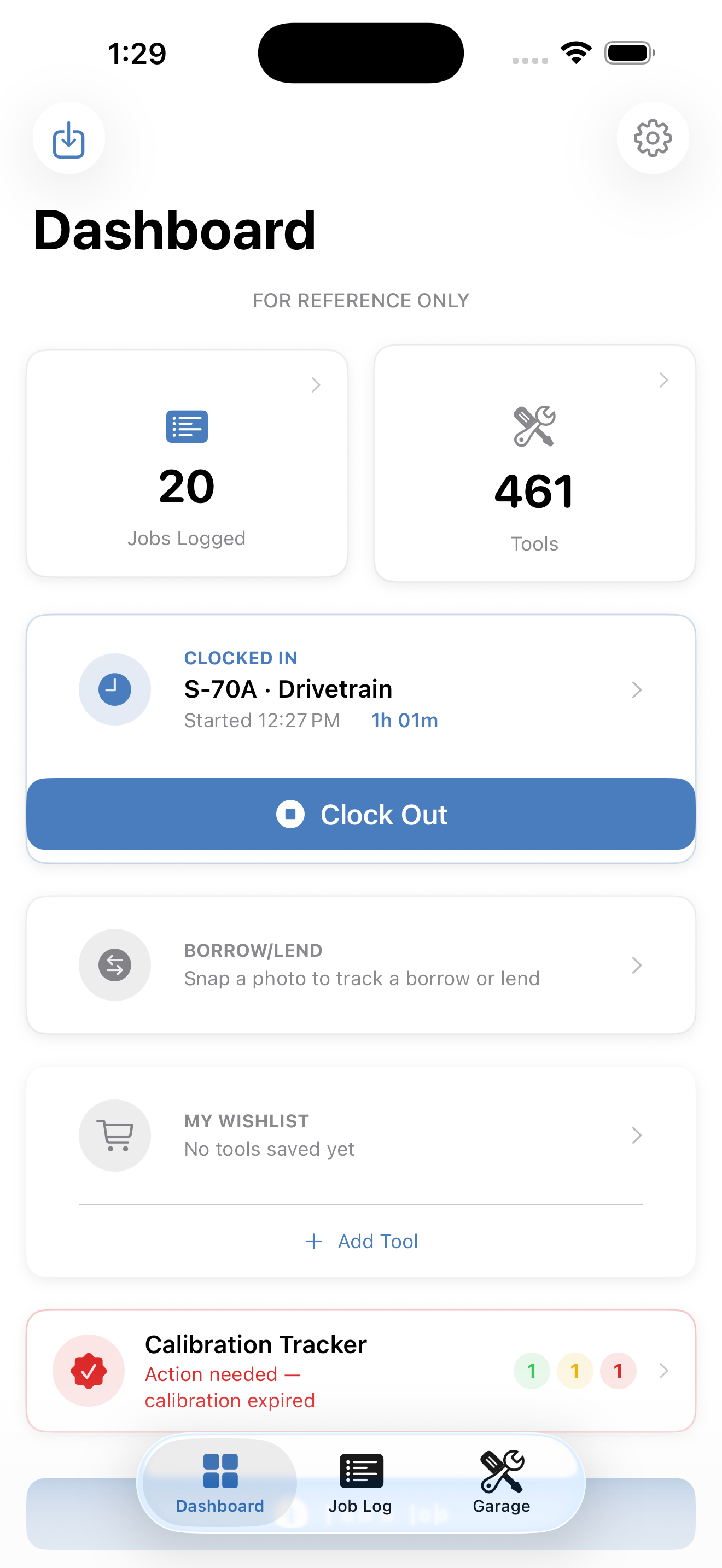
FRO Dashboard
Fig. 1 — DashboardRecent jobs, calibration status, time on task. The disclaimer banner is always visible.
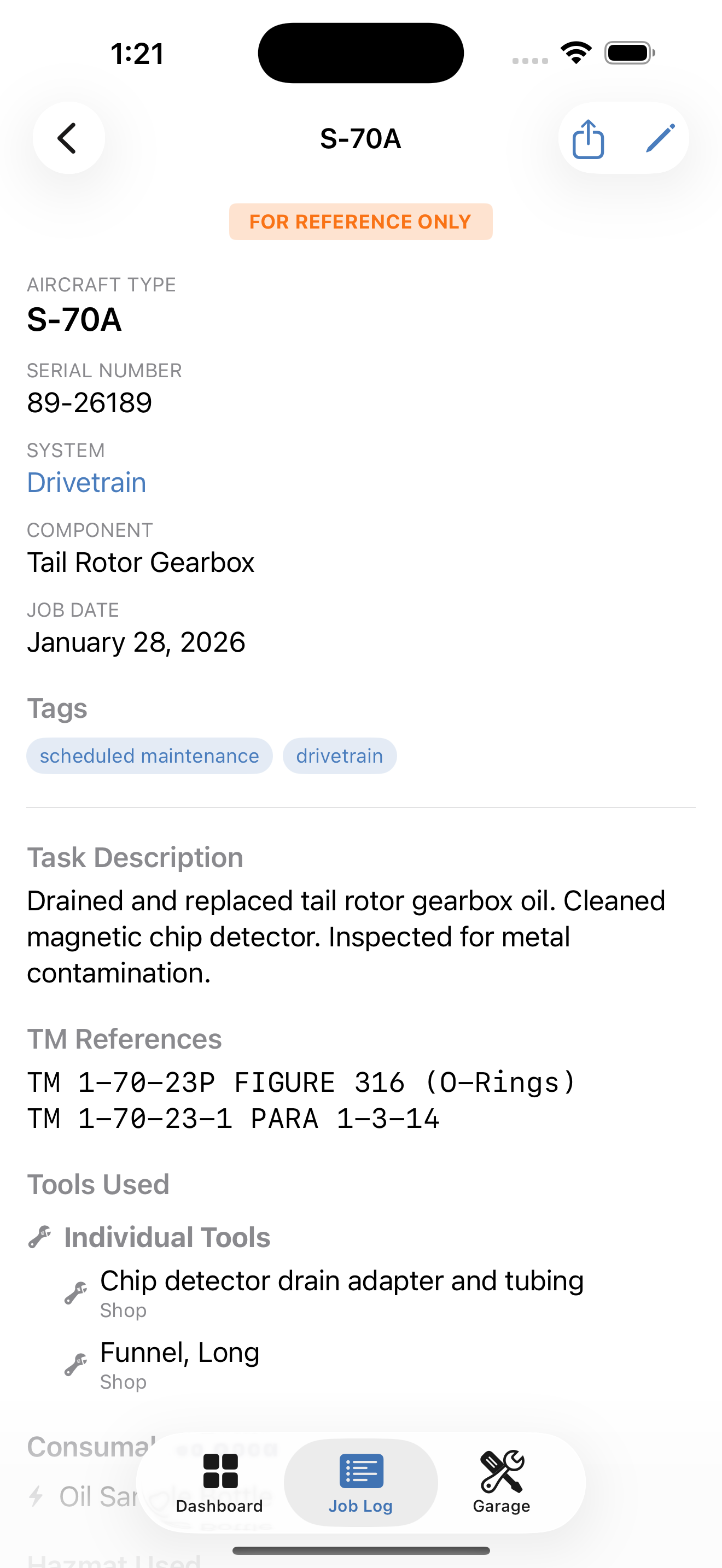
FRO Job Detail
Fig. 2 — Job DetailAircraft, system, tools used, hazmat, parts, notes. Free-form recommendations for next time.
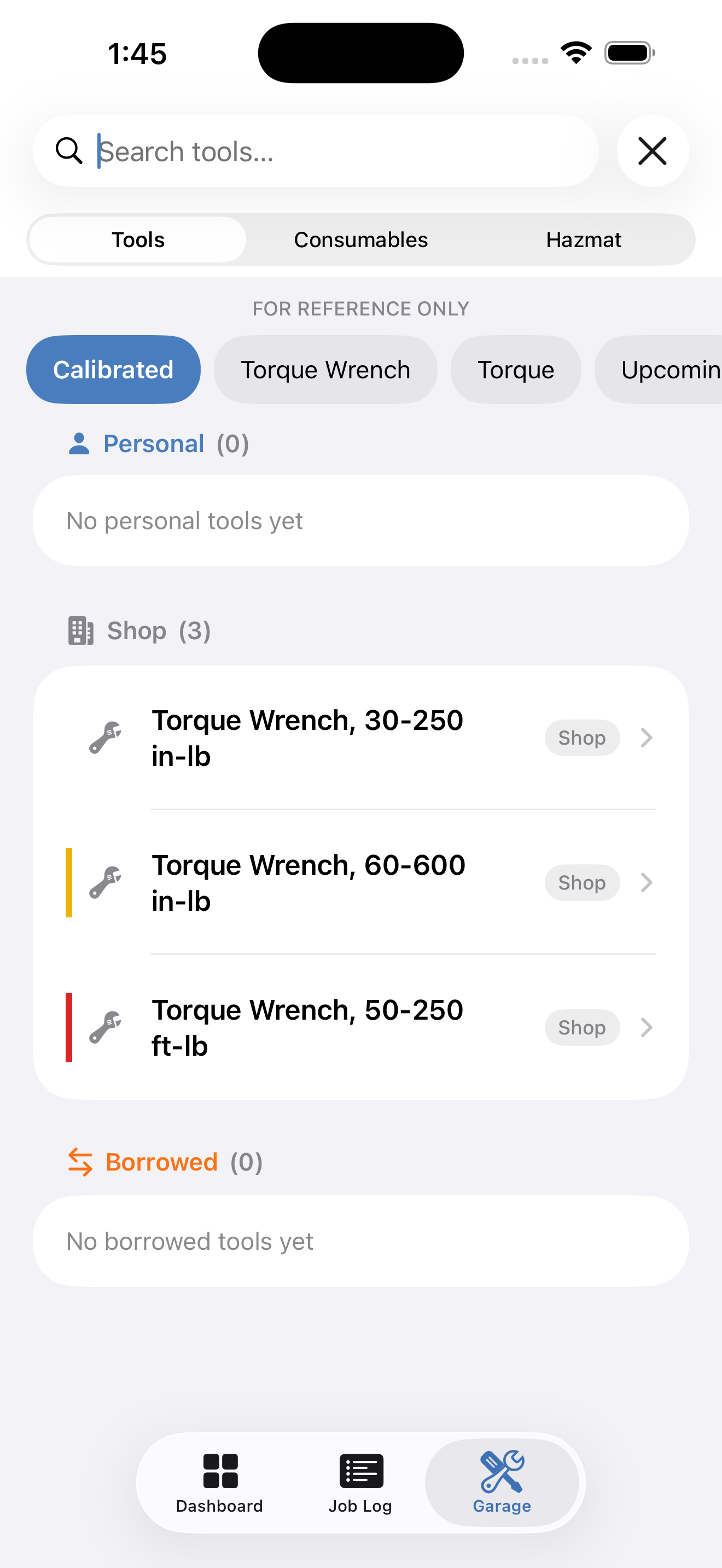
FRO Calibration Tracker
Fig. 3 — Calibration TrackerGreen / yellow / red status on every tool with a calibration date. Scoped to Personal vs. Shop.
§ 5

The loop

Retrospective workflow
01

Walk in prepared

Search prior jobs on this airframe and system. Pull what you used last time and what to watch for.

02

Run the procedure

The TM, AMM, and Work Card stay in charge. FRO doesn't sign off, doesn't approve, doesn't get in the way.

03

Finish the job

The TM tells you the procedure. FRO captures what isn't in the TM — the socket that fit, the alternate that worked.

04

Log it

Aircraft, system, what you used, what to remember. Two minutes if you're slow.

05

Search next time

Three months or three years later, the same airframe rolls in. The notebook is already open.

$2.99
One-time price
0
Bytes leave your device
100%
Offline capable
iOS 17+
iPhone & iPad
The whole pitch

It's the logbook a mechanic never had. Now they do.

$2.99 once · No subscriptions · No accounts · No ads · No data collection
Download on the App Store